Firetik is a MikroTik firewall script that blocks known malicious IP addresses using a daily-updated blocklist built from FireHOL Levels 1–4:
- Level 1 – the core, safest list (details below)
- Level 2 – IPs seen attacking in roughly the last 48 hours
- Level 3 – IPs seen attacking, spamming or hosting malware in roughly the last 30 days
- Level 4 – a more aggressive list that may occasionally block legitimate IPs
Level 1 includes:
- Fullbogons: IP ranges that should never appear on the internet (unallocated and private ranges)
- Spamhaus DROP: networks controlled by spammers and cybercriminals (now includes the former EDROP list)
- DShield: the top 20 attacking /24 networks of the last 3 days
- Malware C&C lists: command-and-control servers used by malware
The firewall rule blocks devices on your network from opening new connections to these addresses, which helps stop malware from calling home and users from reaching known malicious hosts.
Setup
Copy each block and paste it into the MikroTik terminal.
1. Create the download script
/system script add name="DownloadFirehol" source={ /tool fetch url="https://binary.ph/firehol/firehol.rsc" mode=https; }2. Create the script that replaces the old list with the new one
/system script add name="ReplaceFirehol" source={/file
:global firehol [/file get firehol.rsc contents]; :if (firehol != "") do={/ip firewall address-list remove [find where comment="firehol"]
/import file-name=firehol.rsc;}}
3. Schedule both to run daily (download first, apply 5 minutes later)
/system scheduler add comment="Download Firehol list" interval=1d \
name="DownloadFireholList" on-event="/system script run DownloadFirehol" start-date=jan/01/1970 start-time=08:51:27
/system scheduler add comment="Apply Firehol list" interval=1d \
name="InstallFireholList" on-event="/system script run ReplaceFirehol" start-date=jan/01/1970 start-time=08:56:27
4. Run both once now
/system script run DownloadFirehol/system script run ReplaceFirehol5. Add the firewall rule
/ip firewall filter
add chain=forward action=drop comment="Firehol list" connection-state=new dst-address-list=firehol
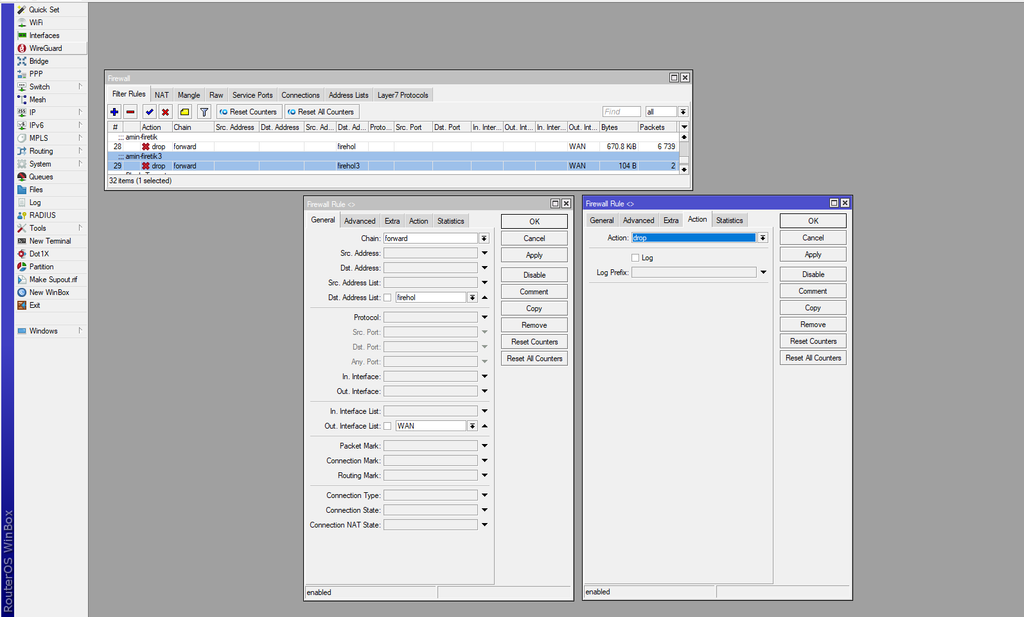
6. Limit the rule to your WAN (important)
The list includes private IP ranges, so without this step the rule can block traffic inside your own network.
Open the “Firehol list” rule and set Out. Interface to your internet port (e.g. ether1).
With multiple internet connections, create an interface list named WAN (Interfaces → Interface List), add your WAN ports to it, and set Out. Interface List to WAN instead.
More
- IPv6 firewall: https://binary.ph/ipv6
- Need help applying other FireHOL levels? Contact me via the About page.
Thanks to Joshaven for his automation scripts and to FireHOL.org for maintaining the blocklists.